Fireground.Trainingby RescueFit
19 Nov 2026Inside the Gear: the radio, a film and a hands-on look inside a portable radio, from the mic and the noise to the board. More → all updates
Open

Rope Rescue Systems

Three rope systems built one step at a time on a 3-D drawing you can spin — the twin-tension Clutch lower to raise, the skate block, and a rappel to a pick-off. Every step goes on with the reason, and the manufacturer's own sentence is one tap away.

Open to anyone — no email, no account, nothing to install.

Open the rope trainer

The department version, with the instructor view, is behind a sign-in. On the list? Open it →

Send feedback →

3 rope systems17 steps on System 113 knot cardsRope v0.98
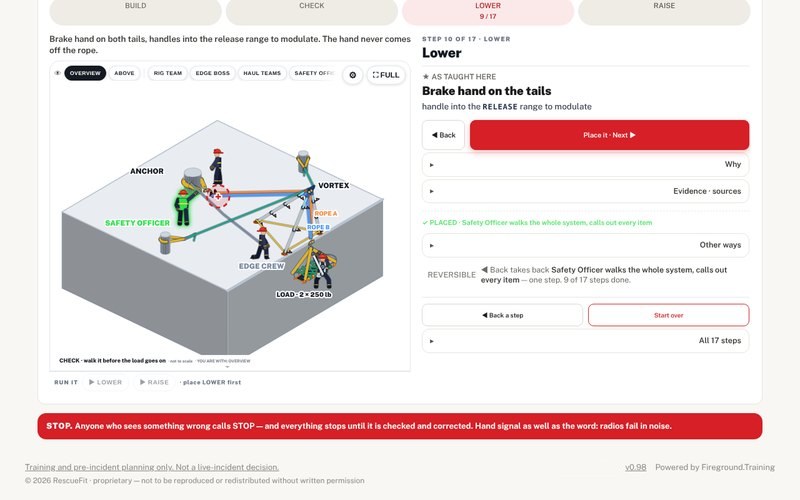
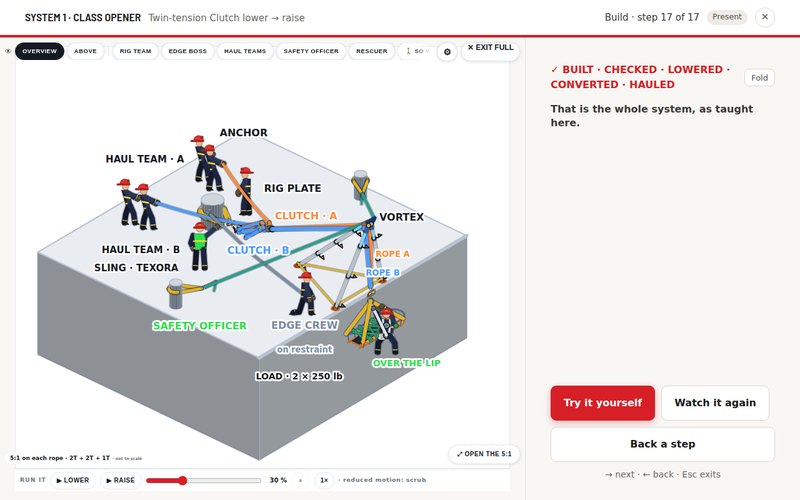
System 1, the lower. Step 10 of 17: brake hand on both tails, handles into the release range. The Safety Officer, the edge crew, and both ropes up over the Vortex at the edge and down to the litter.
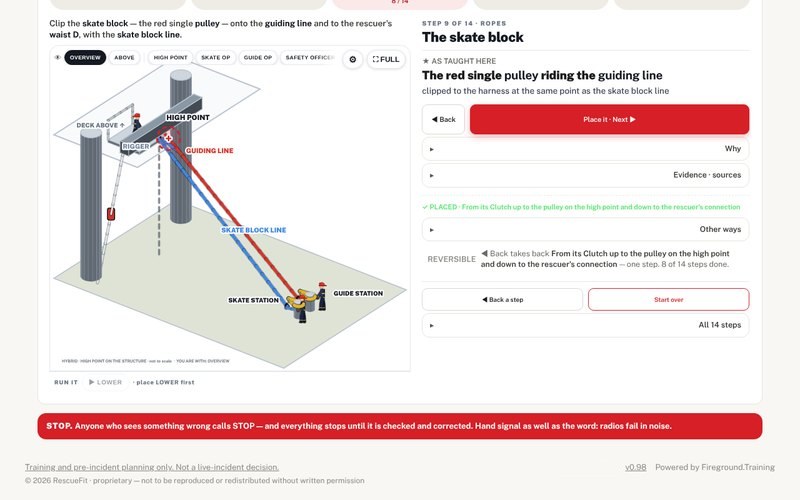
The skate block. The hybrid on a structure, step 9 of 14: the high point, the guiding line in red, the skate block line in blue, each down to its own Clutch station.
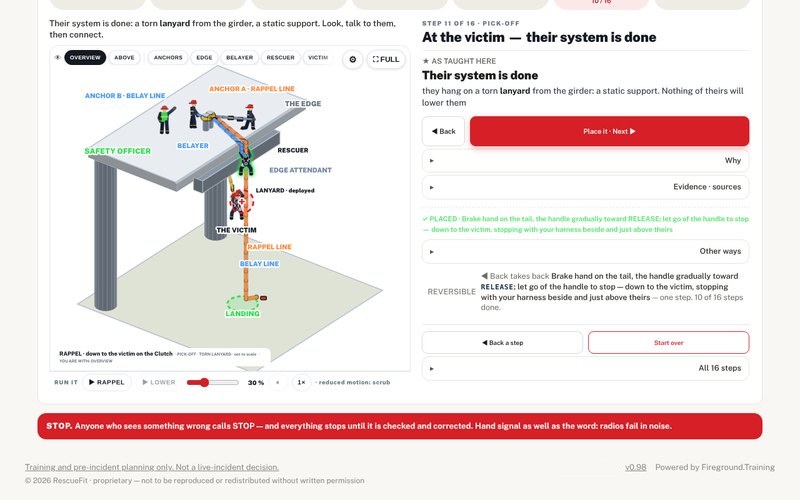
The pick-off. System 3, step 11 of 16: the rescuer on the rappel and belay lines off two anchors, down beside a victim hanging on a torn lanyard.
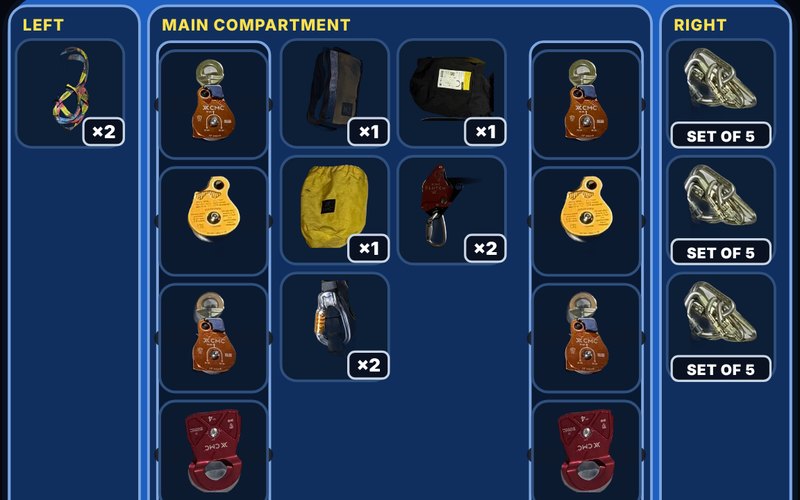
Out of the bag. Rope bag 2 opened pocket by pocket: pulleys on the inside walls, the two Clutches in the middle, carabiners in the right pocket. Every piece is a cut-out photo of the department's own gear, with the count.
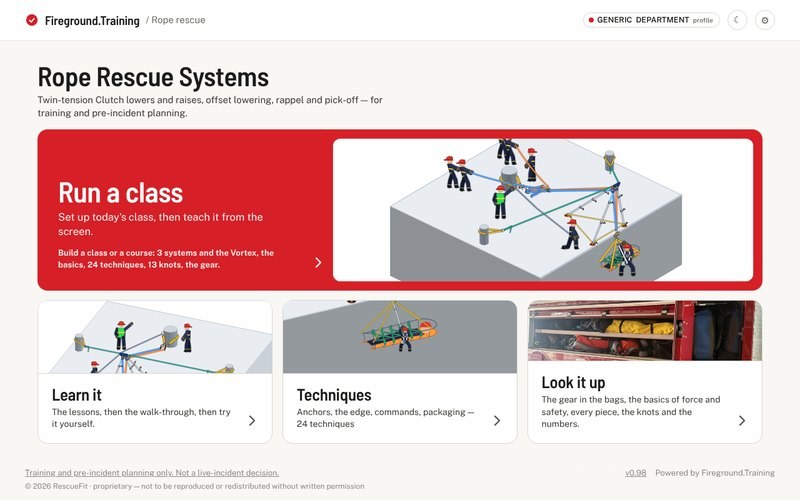
Home. Four doors, each with its own picture. Run a class across the top — build a class or a course from 3 systems and the Vortex, the basics, 24 techniques, 13 knots and the gear — then Learn it, Techniques and Look it up.
The Vortex at the edge. System 1 built and raised, on the projector screen: both mains run over the Vortex head, the litter comes up over the lip, and the edge crew stays on restraint.
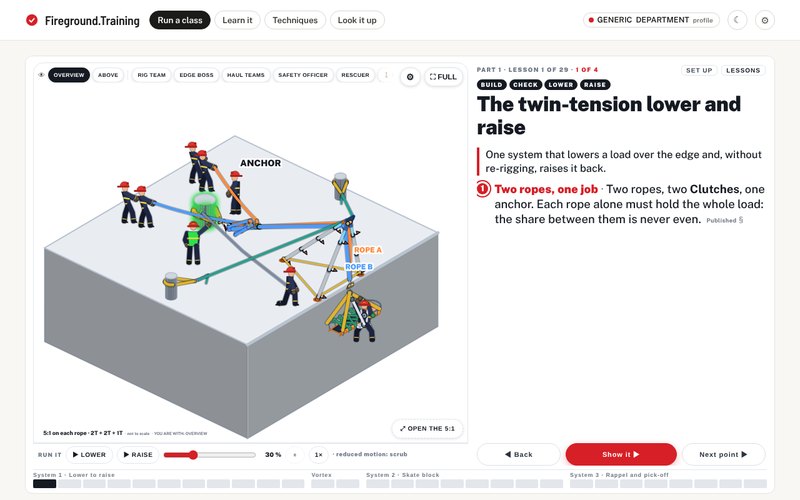
The brief. Lesson 1 of 29, point 1 of 4: System 1 as a whole before a single step — two ropes and two Clutches on one anchor, and each rope alone must hold the whole load. The tags across the top: build, check, lower, raise.
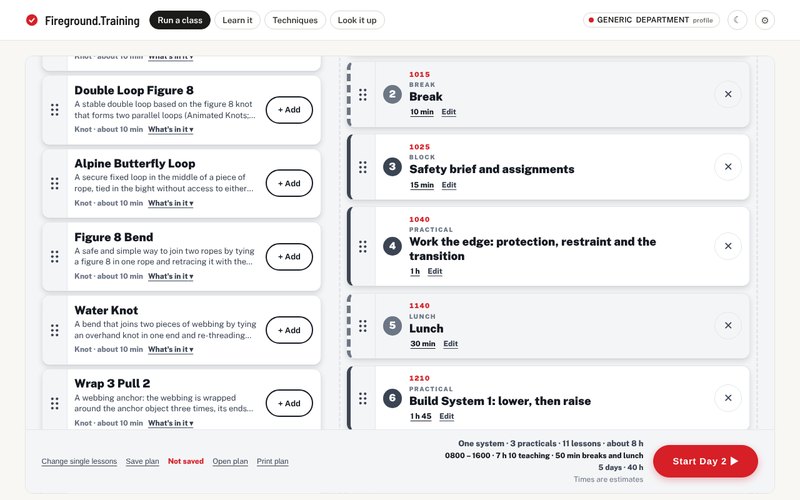
Plan the class. Day 2 of the Five-day course, every row with its clock time: break at 1015, safety brief and assignments at 1025, the edge practical at 1040, lunch at 1140, Build System 1 at 1210. The knot shelf on the left. The foot carries the day — 0800 to 1600, 7 h 10 teaching, 50 min breaks and lunch — and the course: 5 days · 40 h.
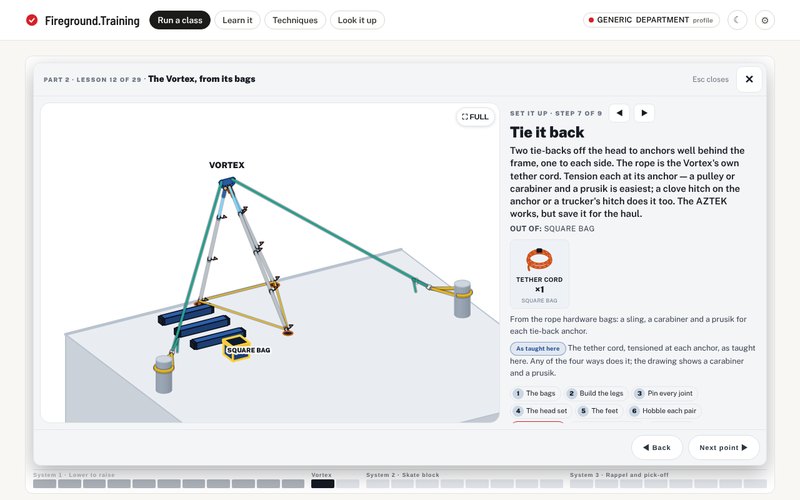
The Vortex, from its bags. Set it up, step 7 of 9: two tie-backs off the head to anchors well behind the frame, on the Vortex's own tether cord out of the square bag.
01

Build it

Seventeen steps on System 1, each placed on the drawing with the reason. Guided shows you, Try it yourself asks — shuffled and unmarked — and Pick from the bags hands you the department's bags and no list.

02

Spin it

A 3-D drawing you drag round. Keys stand you with the rig team, the edge boss, the haul teams, the Safety Officer or the rescuer. Run it plays the lower and the raise.

03

If it locks

Wherever the ASAP LOCK is on the rope: what Petzl says, the one release Petzl publishes, what nobody publishes, and how it's taught here — marked not confirmed until it is.

04

Talk it over

The after-action report: what you built in order, where you left the class's way and what that traded, and what the run never touched. The time is telemetry, not a mark.

System 1, the lower. Step 10 of 17: brake hand on both tails, handles into the release range. The Safety Officer, the edge crew, and both ropes up over the Vortex at the edge and down to the litter.

Three verdicts, never a wrong

As taught here is the one the class runs on. OK works, with a trade-off you read once the step is placed. NO is only what a manufacturer rule or a safety rule forbids, and the rule is on the screen. Evidence on any step opens the manufacturer's own sentence and the manual it came from.

Drag the drawing to spin it. It fills in as each part goes on; tap any part for what it is. Run it plays the lower and the raise, and Bounce shows every jerk landing on the litter.

Out of the bag. Rope bag 2 opened pocket by pocket: pulleys on the inside walls, the two Clutches in the middle, carabiners in the right pocket. Every piece is a cut-out photo of the department's own gear, with the count.

Out of the department's own bags

Every part is a cut-out photograph of one department's real gear, and the bags open on the screen pocket by pocket. Pick from the bags on System 1 takes the list away: open a bag, pick the part, place it.

In a department's own version, the instructor view adds the equipment page as that department's inventory sheet, line for line, with the cell each count came from, and where the sheet doesn't settle something it says so instead of guessing.

The skate block. The hybrid on a structure, step 9 of 14: the high point, the guiding line in red, the skate block line in blue, each down to its own Clutch station.

The skate block, and where they land

An offset lower that puts the package down away from the plumb line. Hybrid — a guiding line and a skate block line, a Clutch at each station — or dual. The high point is a beam on the structure or the Vortex, with MATSAT walked before the ropes are loaded.

Where do they land takes the height and the distance out and shows the touchdown. On the dual, the app's derived figure and the field estimate sit side by side, each labelled for what it is. On the hybrid the guiding line's tension steers it, and no published source gives a target tension — the screen says so.

The full list

Three systems
  • System 1, the class opener: a twin-tension lower on two CMC Clutch 13s, then the raise — a prusik grab, one double pulley across both ropes for the 3:1, and the conversion to a 5:1. Seventeen steps.
  • System 1 at the edge: the Arizona Vortex stands at the lip as an easel — the A-frame pair at the edge, the rear leg back on the deck, two tie-backs — and each main runs over its own pulley at the head, so the raise brings the litter up and over the lip instead of into it. On by default; WITHOUT puts back the old rig, the mains over edge sleeves, for a side-by-side. A drawing only: the app computes no force for an easel at an edge.
  • The anchor end is drawn as the sling it is on all three systems: a Texora loop round the anchor, a carabiner in each end, into the rigging plate — so the anchor stands where the sling reaches.
  • The Vortex from its bags: the four bags and what is in each, every part with how to tell it and its job, and SET IT UP — nine steps from the bags to the finished frame, at System 1's edge or System 2's parapet.
  • System 2, the skate block: an offset lower that puts the package down away from the plumb line. Hybrid — a guiding line and a skate block line, a Clutch at each station — or dual: two lines, one operator, a double pulley riding both. The dual's block is drawn from the rig model, and Run it moves it along the run.
  • The skate block's high point is a beam on the structure or the Vortex. On the Vortex the drill adds its own steps and walks MATSAT before the ropes are loaded.
  • Two optional improvements on the skate block, off by default so the basic rig goes together first: the AZTEK for height control, and a small MA to put tension on the guiding line.
  • System 3: rappel on your own Clutch with a belay line off a second anchor, then either ascend back to the lip or pick off a victim — one hanging on a working system, or one whose lanyard has torn.
Build it, one step at a time
  • Guided walk-through: tap Place it · Next and each step goes on the drawing with the reason. Back takes a step off, as often as you like.
  • Try it yourself: the same steps asked as questions, the answers shuffled, nothing marked. Tap what you'd do and it tells you which way you picked, and why.
  • Three verdicts, never a wrong. As taught here is what the class runs on. OK works, with a trade-off you read once the step is placed. NO is only what a manufacturer rule or a safety rule forbids, and the rule is on the screen.
  • A refused answer stays on the list, struck through, so you see what's gone — and the question stays open until you place something.
  • Pick from the bags, on System 1: no list. Open the department's bags, pick the part, place it.
The drawing
  • Drag it to spin it. It fills in as each part goes on; tap any part for what it is.
  • Keys along the top stand you with a team. On System 1: the rig team over the plate, the edge boss, behind the haul teams, the Safety Officer, the rescuer on the wall. The skate block adds the rigger at the high point, each line's operator, and the landing.
  • The check is a step: the Safety Officer walks the whole system out loud, anchor to load, before anyone puts weight on it.
  • Run it plays the lower, the raise, the rappel and the ascend — rope paying out, the load moving along its path. Bounce shows every jerk landing on the litter. It's a drawing pace, not a rope speed.
  • Full screen puts the step beside the drawing for a projector, and a USB clicker runs the drill, answers included.
  • Run a class, the first of Home's four doors, opens Today's class empty, and Start the class stays off until something is in it. Start from a sample plan, or drag in what you're teaching — a system, a technique, a knot or a piece of gear — in the order you'll teach it, or tap + Add. Add all four puts in System 1, the Arizona Vortex, System 2 and System 3: twenty-nine lessons, about 7 h 10. + Break, + Lunch, + Practical and + Block go into the same list; a practical comes off a list, the ones that fit what's above it offered first, or you write your own. Every row shows its clock time, counted from the day's start, and any row's length can be changed. More than two hours of teaching with no break gets a line on the row. A plan runs from one day to fourteen, a tab a day, and Start runs the day that is open. In the class a break or a practical is a screen of its own; a break shows the time you're back. Once a class has run, Resume takes you back to the lesson and the point you were on. Each of the three systems opens on a title card, then a brief on the system as a whole — what it is for, its lines and what each one does, who is on it, how it runs — then a gear lesson: the pieces from the bags, each with its one job. The Vortex opens on its title card, then its two set-ups from the bags, at the edge and at the parapet, one step at a time. Every lesson opens on its title and its one line, and Next brings the points one at a time; on the drawing, what each point adds lights up. Most points are marked Published, As taught here or Not confirmed. Back, Show it and Next, a tick per lesson, and a clicker runs it. Show it opens the step, the view or the technique card the lesson points at; Return to class, or Esc, brings you back to the same point. Set up, on any lesson, reopens Today's class with the class as it runs.
  • Build a class from anything. Start from Empty or one of four sample plans — Rope basics, Refresher, The full course over two days, and the Five-day course, 40 hours — then pick from five shelves: the systems, the basics, 24 techniques, 13 knots and 37 pieces of gear. Each pick becomes its own screen in the class, in the card's own words, with SHOW IT. What's in it, on every card, opens it where it sits: a system shows its lessons, each with a tick, and a tick off leaves that lesson out of the class. Every lesson, sample and class carries an estimated time — the whole book about 7 h 10.
  • The plan is a file. Save plan downloads it, Open plan reads it back, and Print plan prints it, a table a day. On a phone that can share a file, Share plan hands it to the share sheet. Not saved sits beside Save plan until you save it. The file carries the plan and nothing else. Nothing is stored in the browser and nothing is sent anywhere: close the tab and an unsaved plan is gone.
  • House way, under Change single lessons at the foot of Today's class, or H during the class: reorder, hide or repeat single lessons for the room. It never rewrites a lesson. For a one-day class of whole systems and single cards the arrangement is a class code — copy it, type it back next time, and the class comes back. Anything more — a break, a practical, a lesson ticked off, a set length, a second day — has no code and is saved as a file. Nothing is stored.
  • Lessons, beside Set up: the whole class on one screen by system, the lesson you're on marked. Tap a lesson to go there, tap a system to start it. G opens it; a number key starts a part from any lesson — 1 to 4 with all four in. It follows today's order.
If it locks, and what catches you
  • IF IT LOCKS opens wherever the Petzl ASAP LOCK is on the rope: what Petzl says about a blocked device, the one release Petzl publishes and why it isn't this build, what nobody publishes, and how it's taught here — marked not confirmed until it is.
  • What we carry: the absorber the department actually runs, and where that sits inside Petzl's stated use and where it doesn't.
  • On the rappel, the second line offers the ways to catch a fall — a Clutch, an MPD, a tandem prusik belay, the ASAP LOCK — and refuses the single-person absorber once two people are hanging on it, with Petzl's sentence beside it.
  • Belayed from the first inch, or the belay taken up before the pick-off: a switch at setup.
  • Where the lines land on the harness: the class's way is drawn, and every published sentence found for it and against it sits beside it — including the one printed on the harness's own instruction card.
Knots, anchors and the gear
  • Thirteen knot cards: what each one is, where it's used, how to tie it step by step, and what to watch for. Twelve carry their published sources with links. Where the sources disagree — tensionless hitch diameter, prusik wraps, water knot tails — the card shows the disagreement.
  • Techniques: at the edge, anchors, patient packaging, commands and the check, on the rope. Each one: what it is, when and when not, how it is taught here, and what goes wrong. Where a card's picture is drawn from the rig, drag it to turn it.
  • Two techniques run on a player beside the drawing — Learn, Explore, Practice. Sharing a load between two anchors: move the angle from 30° to 135° and read each leg's share off the drawn legs, with marks at 90° and 120°, then five questions, predict then reveal. The edge transition: step through it, and Explore reads off the drawing where the rescuer is — the restraint, the system, his weight — up to the release moment, then five questions. In a class the same player runs from the keys.
  • The Clutch on its own screen: photographs of the device, and a schematic you set to Stop, Stand-by, Release and Anti-panic, each in the manual's words.
  • The bags open on the screen, pocket by pocket, every part a cut-out photograph of the department's own gear — the Clutches, the MPD, the AZTEK, the GRILLON, the ASAP, the pulleys, the plate.
  • Learn it, the second door, takes one system at a time: its opening lesson, the walk-through, or try it yourself. Techniques, the third, is a door of its own: anchors, the edge, commands and packaging — 24 techniques.
  • Look it up, the fourth door, opens straight onto the bags, with a row to the basics, every piece, the knots and the numbers.
  • The basics, in Look it up's row: seven screens on one page — the load; where a rope turns, with the angle on a slider; MA at the top, four rigs at the tip side by side, standing still, hauling and lowering; what the gear is rated to take, read from each piece's own record; safety factors; when a margin is gone, and why two ropes; then five questions to check yourself. Every number shows where it came from. The first six are class screens on their own Basics shelf.
After the run, and where it all comes from
  • The after-action report: what was built, in the order it was taken; every place the build left the class's way, with the trade-off already on that option; the maker conflicts it walked into; and what the run never touched. It is written from the run you made: a pick-off belayed on a Clutch carries no absorber block, and a skate block run finishes BUILT · CHECKED · LOWERED.
  • On a pick-off, leave the AZTEK and the pick-off strap in the bag and the drill refuses the pull: nothing in it connects you to the victim. Change the victim after the build and the steps at the victim open again.
  • The time is telemetry, not a mark — a lap trace with no numbers on it, never set beside anyone else's, and it decides nothing about whether a run counts.
  • A five-character code rebuilds the same rig, branch and difficulty on a shiftmate's phone. It carries the setup and nothing else.
  • Evidence · sources on any step opens the manufacturer's own sentence and the manual it came from. Where two makers disagree, the step carries an open maker-conflict band instead of picking a winner.
  • Each line is marked in three words: Published, As taught here, Not confirmed.
  • A department's own version adds the instructor view: Free build, every step on one list in any order the rig allows; Walk it, the Safety Officer's route round the finished rig, station by station; and the equipment page as the department's inventory sheet, line for line, with every source, chip and open item.
  • Nothing is stored in the browser and nothing is sent anywhere. Close the tab and the run is gone; a class plan lasts only if you saved it as a file.
  • It's for the classroom half of a rope class. It doesn't replace hands-on training, and it isn't for a live incident.
What’s coming In development
  • The hybrid's skate block on the rope. The dual's block is drawn from the rig model now; the hybrid's block and backup aren't yet. Next the block rides the guiding line, the ASAP LOCK above it, the rescuer hanging from both — and Run it moves him along the line.
  • The AHD as the high point. The skate block's high point is a slot: the beam is built, and the tripod, bipod and aerial from the AHD Trainer go in next.
  • Pick from the bags on System 2, once its gear slots are built.

The open copy runs on a generic department: the same three systems, lessons, knots and gear, with no sign-in. Want it built for your crew — your department’s name on the front and your own rope equipment in it? Get in touch.

Open the rope trainer

The open copy: fireground.training/rope/open. ← All the apps